Use Case: Onboarding Teachers
How OrgAdmins bring new teachers into the organization.
Prerequisites
- OrgAdmin access to platform
- New teacher contact information

Phase 1: Preparation
Step 1: Verify Organization Settings
- Go to "My School" -> "Settings"
- Confirm organization name, contact information, default timezone, and billing setup
- Configure teacher defaults: default token allowance, standard course templates, shared resources access
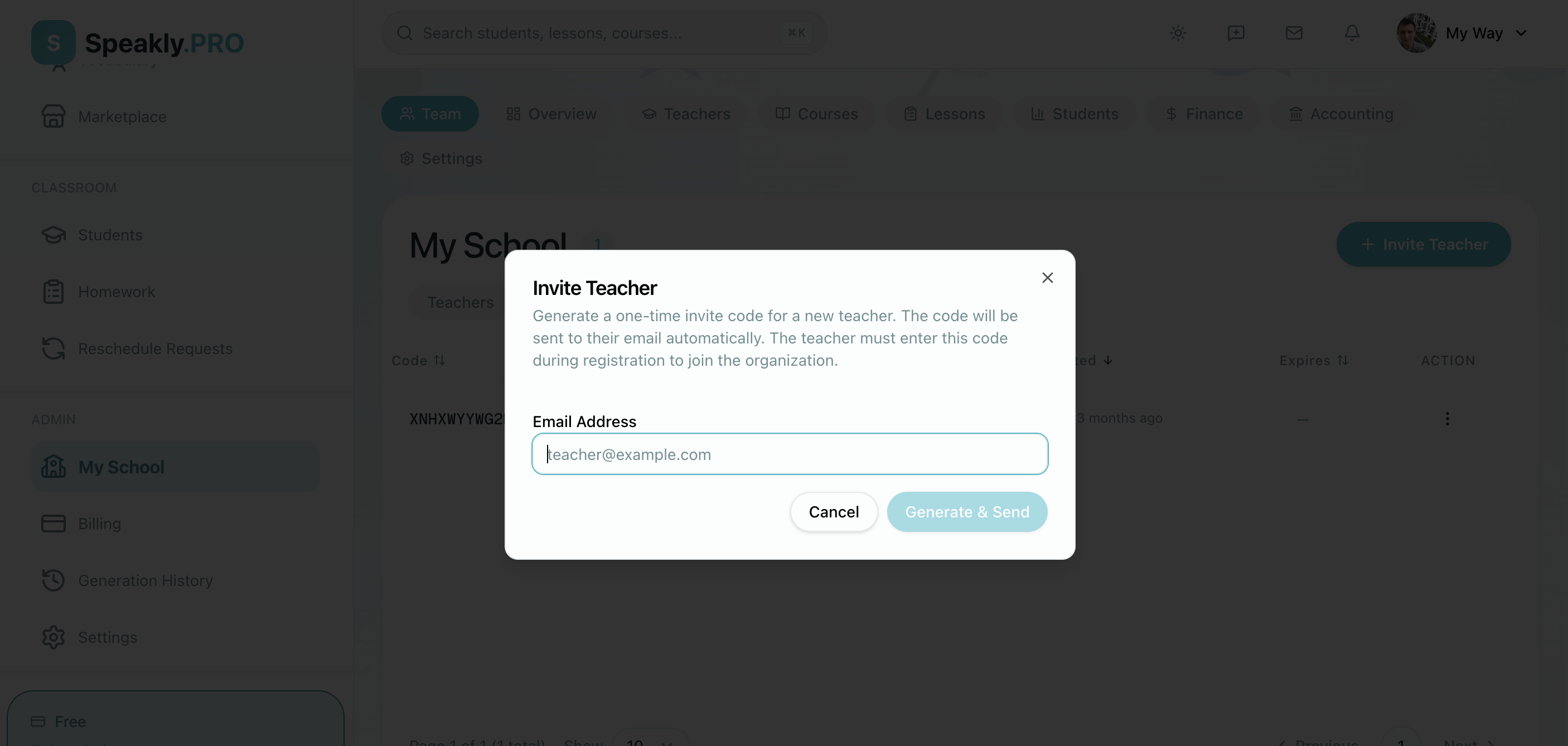
Step 2: Generate Invite Code
- Navigate to "My School" -> "Teachers"
- Click "Generate Invite Code"
- Configure:
- Role: Teacher (or OrgAdmin if applicable)
- Quantity: 1 (specific to this teacher)
- Email Association: New teacher's email
- Generate code
- Copy code and invitation link

Phase 2: Invitation and Initial Setup
Step 3: Send Invitation
Share the platform URL and invite code with the new teacher. Include:
- The invite code
- A link to the platform
- Orientation meeting date/time
Step 4: Teacher Self-Registration
The teacher's setup process:
- Click platform link, click "Sign Up" or "Join Organization"
- Enter invite code
- Fill in profile information, set password, verify email
- Complete profile: upload photo, write bio, list teaching languages, add credentials, set availability

Step 5: Verify Teacher Setup
- Go to "My School" -> "Teachers"
- Find new teacher in list
- Verify:
- Profile complete
- Email verified
- Role assigned correctly
- Organization assigned
- Token balance allocated
- Check invite code status: should show "Used", linked to teacher account

Phase 3: Orientation and Training
Step 6: Platform Training
Session 1: Content Creation (45 min): Create a test course, build a sample lesson, add exercises, use AI generation, preview as student.
Session 2: Student Management (30 min): Enroll test student, assign homework, grade submission, send message, view analytics.
Session 3: Advanced Features (30 min): Schedule live session, use vocabulary tools, marketplace basics, billing and tokens, reports and analytics.

Phase 4: First Week Activities
Step 7: First Course Creation
- Choose course topic, define learning objectives, outline structure
- Build first 2-3 lessons using provided templates
- Preview all content, test exercises, get feedback
- Set to "Published" and enroll test students

Step 8: First Student Interaction
- Create or use test student account
- Enroll in teacher's course
- Complete a lesson and submit homework
- Teacher grades the homework, provides feedback, sends message, views progress
Troubleshooting
Technical Difficulties
Issues: Cannot access platform, invite code not working, profile will not save, confused by interface.
Solutions: IT support hotline, screen sharing help, alternative access methods, additional training.
Next Steps
- Creating Courses - Deep dive into course creation
- Managing Enrollments - Student management
- School Guide - Comprehensive reference